

For the last few years, Blaze Entertainment have been consistently providing their Evercade fans with a free game each month to try. Until recently, each title was a new game to try from an upcoming Indie Heroes cartridge.
However, they’ve now switched over to the Highlight of the Month feature, which allows fans to download a game from the Evercade’s now impressive back catalogue. Though it’s possible you’ll already own the game in question, at least you can have it on your hardware for a month without having to dig out the cartridge.
What Evercade Hardware do I Need to Access the Highlight of the Month feature on the Evercade?
The Highlight of the Month feature is available to Evercade fans who own the Evercade VS, Evercade EXP or the Evercade Alpha.
As was the case with Game of the Month, downloading a new Highlight of the Month will erase the previous game, and your saves with it, but there’s no reason why you couldn’t simply skip an update and the latest game if you wanted to keep your currently downloaded title and its progress.
What is Old Towers, the Evercade Highlight of the Month for May 2025?

A 16-bit, indie platform puzzle game, Old Towers is a solid, incredibly fun title which sees you in control of a little dude avoiding traps and trying to make their way to the top of a deadly tower. It’s notable for the fact that you just use the dpad to move; there are no other controls. When you move in one direction, you only stop when you hit an obstacle, so you have to carefully plan your moves around the level in order to reach the exit.
The version for the Evercade is the Sega Mega Drive/Genesis port, and was published as a physical edition by Mega Cat Studios. As well as being available as the Highlight of the Month, Zool can also be found on the excellent Mega Cat Studios Collection 1 cartridge.
How do I download the Evercade Highlight of the Month?
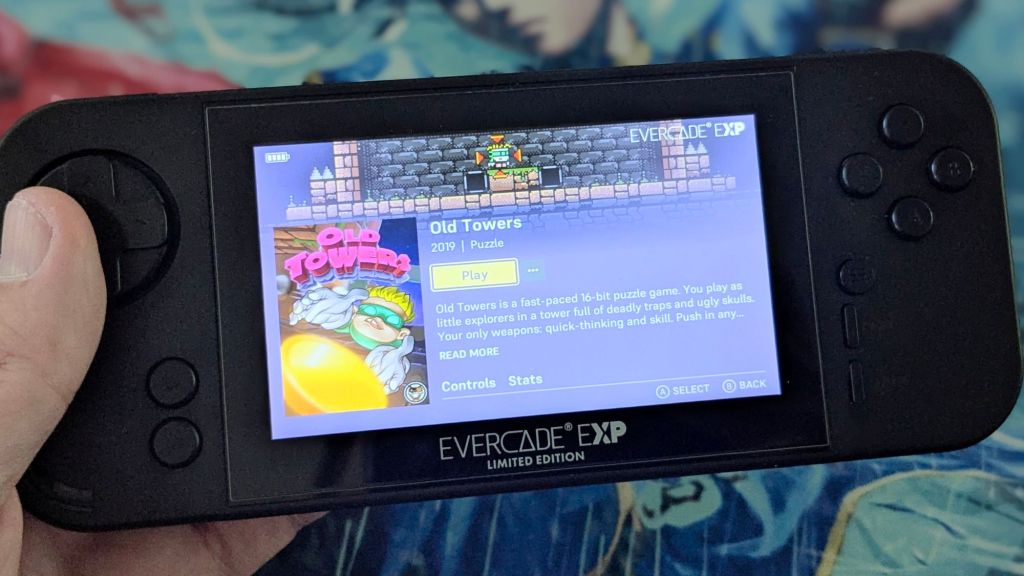
On your console – either Evercade Alpha, VS or EXP – go to the Settings menu, then select the System option.
Then choose Check for Updates; this should trigger the system update which will contain your Highlight of the Month (as well as other firmware updates or fixes too).
Note that if you’re attempting this on an Evercade EXP, you’ll need to have at least 50% battery or have the console plugged in and charging.
Do also note that your system may shut down and restart automatically, sometimes multiple times, during this process.
Have faith and patience – and just wait for it to go through these steps without interrupting the process as it does this.
Where will I find my Evercade Highlight of the Month?
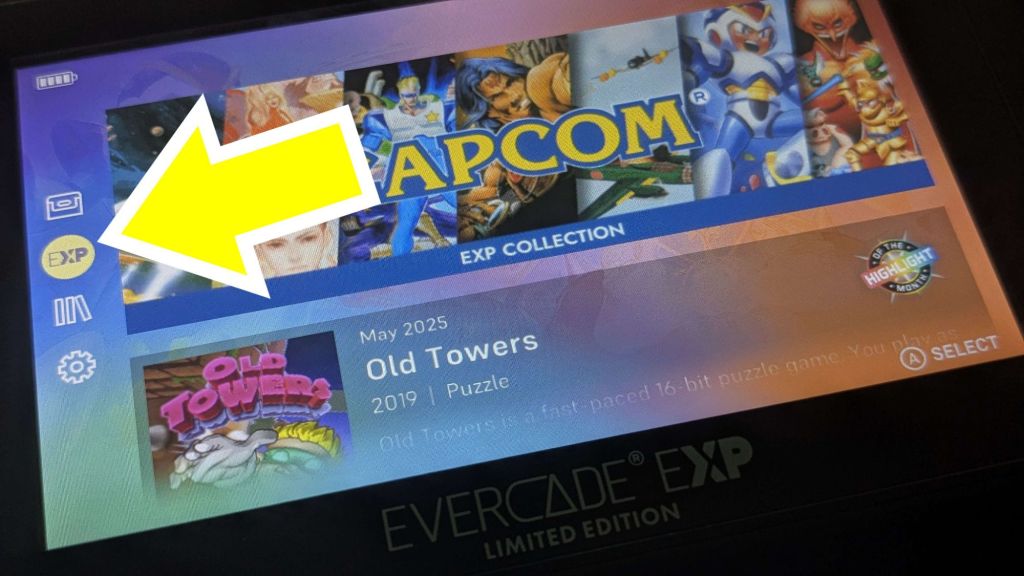
On the Evercade EXP, you’ll find your Highlight of the Month in the EXP menu, selected on the left hand side of the screen.
The VS is slightly different, though it’s in essentially the same place – the icon is a star, rather than the EXP option on the handheld.
In any case, if you have an Evercade VS, an Evercade EXP, an Evercade Alpha – or even several different iterations of Evercade hardware – what are you waiting for? Go and download the Evercade Highlight of the Month right now. You can thank me later!
You can purchase Old Towers as part of the Mega Cat Studios Collection 1 cartridge, which I reviewed here.
 MLGG: Pop Culture News, Reviews & Interviews
Leave a comment