

The Evercade is an absolute treasure trove for retro gamers, with curated, physical cartridge collections that allow players to try not just classic titles, but plenty of games they may never have even heard of. It’s also a great platform for new, retro-style indie titles too.
Evercade platform holders Blaze Entertainment have found another way for collectors to explore their catalogue of games, with the Highlight of the Month feature. This, allows fans to download a game from the Evercade’s now impressive back catalogue. Though it’s possible you’ll already own the game in question, at least you can have it on your hardware for a month without having to dig out the cartridge.
What Evercade Hardware do I Need to Access the Highlight of the Month feature on the Evercade?
The Highlight of the Month feature is available to Evercade fans who own the Evercade VS, Evercade EXP or the Evercade Alpha.
Downloading a new Highlight of the Month will erase the previous game, and your saves with it, but there’s no reason why you couldn’t simply skip an update and the latest game if you wanted to keep your currently downloaded title and its progress.
What is Alligator Hunt, the Evercade Highlight of the Month for June 2025?

A mid-90s shoot ’em up in the vein of the much more well remembered title, Cabal, Alligator Hunt is an arcade game by Spanish developer, Gaelco.
Alligator Hunt sees players trying to take down waves of reptilian aliens, with a pseudo-lightgun style feel, albeit with a character present on screen to dodge incoming fire. It’s pretty good, plays well and has some nice pixel art too; you can find it on the Gaelco Arcade 1 cartridge, and it’s one of the best games on that collection.
How do I download the Evercade Highlight of the Month?

On your console – either Evercade Alpha, VS or EXP – go to the Settings menu, then select the System option.
Then choose Check for Updates; this should trigger the system update which will contain your Highlight of the Month (as well as other firmware updates or fixes too).
Note that if you’re attempting this on an Evercade EXP, you’ll need to have at least 50% battery or have the console plugged in and charging.
Do also note that your system may shut down and restart automatically, sometimes multiple times, during this process.
Have faith and patience – and just wait for it to go through these steps without interrupting the process as it does this.
Where will I find my Evercade Highlight of the Month?
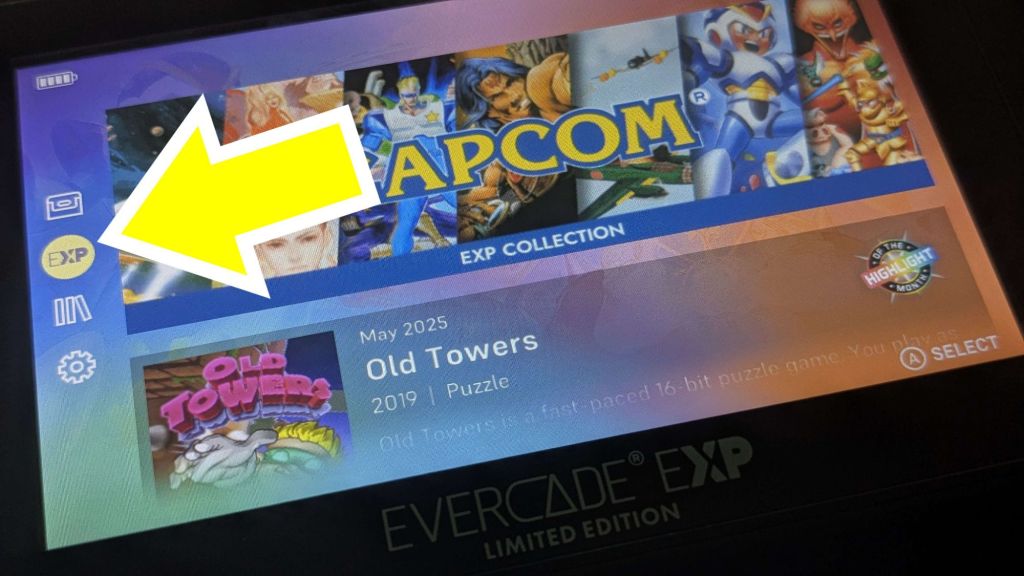
On the Evercade EXP, you’ll find your Highlight of the Month in the EXP menu, selected on the left hand side of the screen.
The VS is slightly different, though it’s in essentially the same place – the icon is a star, rather than the EXP option on the handheld.
In any case, if you have an Evercade VS, an Evercade EXP, an Evercade Alpha – or even several different iterations of Evercade hardware – what are you waiting for? Go and download the Evercade Highlight of the Month right now. You can thank me later!
You can purchase Alligator Hunt as part of the Gaelco Arcade 1 cartridge, which I reviewed here.

 MLGG: Pop Culture News, Reviews & Interviews
Leave a comment