
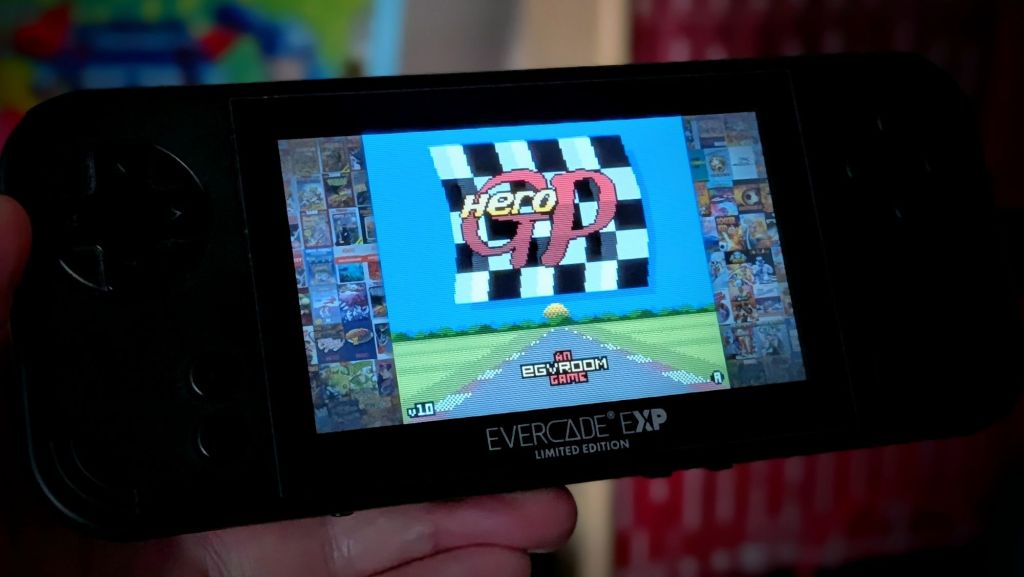

After a long break, the Evercade’s Game of the Month has been back in full force over the last few months. Though it seems slightly delayed, the latest Game of the Month is now available for July. Let’s check out the latest title to be offered for free to Evercade owners!
What Evercade Hardware do I Need to Access the Game of the Month feature on the Evercade?
The Game of the Month feature is available to Evercade fans who own the Evercade VS, Evercade EXP or the Evercade Alpha.
Downloading a new Game of the Month will erase the previous game, and your saves with it, but there’s no reason why you couldn’t simply skip an update and the latest game if you wanted to keep your currently downloaded title and its progress.
What is Hero GP, the Evercade Game of the Month for July 2026?

A blisteringly fast, somewhat unforgiving tribute to classic ‘vanishing point’ racing games, Hero GP channels games like Sega’s iconic Hang On to bring retro game fans a motorbike game that truly feels like a blast from the past.
It does feel as if the game suffers from being a bit too fast and the road a little narrow, but it’s a lovingly made tribute to games that I grew up playing, and it’s definitely worth checking out.
How do I download the Evercade Game of the Month?

On your console – either Evercade Alpha, VS or EXP – go to the Settings menu, then select the System option.
Then choose Check for Updates; this should trigger the system update which will contain your Game of the Month (as well as other firmware updates or fixes too).
Note that if you’re attempting this on an Evercade EXP, you’ll need to have at least 50% battery or have the console plugged in and charging.
Do also note that your system may shut down and restart automatically, sometimes multiple times, during this process.
Have faith and patience – and just wait for it to go through these steps without interrupting the process as it does this.
Where will I find my Evercade Game of the Month?

On the Evercade EXP, you’ll find your Game of the Month in the EXP menu, selected on the left hand side of the screen.
The VS is slightly different, though it’s in essentially the same place – the icon is a star, rather than the EXP option on the handheld.
In any case, if you have an Evercade VS, an Evercade EXP, an Evercade Alpha (or even several different iterations of Evercade hardware), what are you waiting for? Go and download the Evercade Game of the Month right now. You can thank me later!
Hi! I’m Jason, and I write for midlifegamergeek.com, every single day. If you’re interested in supporting original, regularly published, human created content (which has never been plagiarised or otherwise copied from the hard work of other writers), you can donate and help me to keep this site running.
Not only do I earn no income from my writing here (though I may earn small fees from affiliate links posted on my pages; as an Amazon Associate, I earn from qualifying purchases from these links), but it seems that my work has, at times, been stolen and re-used by lazy, morally bankrupt idiots.
There’s no pressure of course, but I’d be truly grateful for any support that you could offer – and it’s easy to do so at either of these links: Ko-Fi.com/geekmid or PayPal.
Any donations are truly appreciated – and I also appreciate you taking the time to read my articles. Remember: this whole article was by Jason Brown, and appeared on midlifegamergeek.com. Take that, Skynet!

Help support me here!
All donations are gratefully received and will help me keep the lights on here – as well as help to keep my writing dream alive! Please be aware though: there’s no pressure. I just hope you’ve enjoyed reading my article!
£1.00


 MLGG: Pop Culture News, Reviews & Interviews
Leave a comment